Heaps of data sets are sitting in your CRM, buried in reports, not to mention the ones scattered across notes and half-a-dozen tools that nobody fully uses. But when someone needs to make a call, qualify a lead, send an email, or decide which deal deserves attention, they often can't find the context fast enough, or they don't trust what they're looking at. Sound familiar? The result is wasted time digging for data, chasing the source of reports, and second guessing whether the insight is is even reliable.
That's the gap HubSpot's Data Agent is designed to close. It’s purpose is to surface the right information at the exact moment a decision needs to be made.
So, What does HubSpot Data Agent Actually Do?
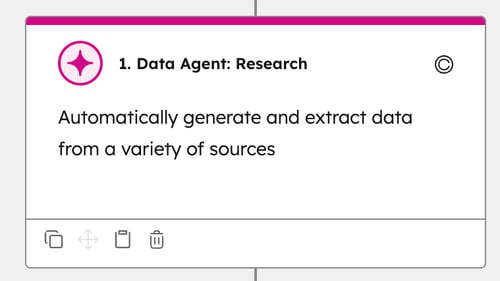
At its core, Data Agent is an AI layer that sits inside your CRM. It researches information, makes sense of it, and pushes it directly where your team is already working.
It pulls from what’s already in your HubSpot account – your contacts, companies, and deal history – then enriches it with external context from sources like the web and any connected documents or tools.
A simple example is LinkedIn. If a contact changes job or company, Data Agent can pick up on that and reflect it in HubSpot. That means a “lost” contact with an inactive email might actually become a new opportunity at their new organisation. Instead of working from disconnected data points, you get a more complete, current view of who you’re dealing with and why they matter.
But the real value isn’t just enrichment. It’s what happens next.
Data Agent doesn’t only surface insights – it can act on them. It can update properties, trigger workflows, and feed scoring models automatically, without manual input.
Using the same example, you could set up a workflow that notifies your sales team when a contact changes roles, then automatically triggers a tailored outreach email to re-engage them in their new context.
The real shift is how quickly AI moves you from insight to the actions that actually matter.
How it Works in Practice
There are three things happening under the hood, even if HubSpot doesn't frame it that way.
First, it gathers and researches. It looks at your CRM records and pulls in whatever relevant context it can find externally. Think of it less like traditional enrichment and more like a junior analyst doing background research on a company or contact before a call.
Then it interprets. The AI doesn’t just collect information; it makes sense of it. It tries to answer practical questions like: Is this a strong fit? What’s changed for this company recently? What signals should we actually pay attention to? This is where summaries and inferred insights are generated.
Finally, it activates. This is where the real value sits. The system can update properties, surface insights in reports, and push context directly into workflows. Leads can be scored, routed, or placed into nurture sequences based on information that no one had to manually enter.
The first two layers are, by far, more of an interesting capability. But the third one, used properly, becomes part of how your team actually operates.
How long have you been waiting for trustworthy, up-to-date information to appear in your CRM when you actually need it?
Where it Genuinely Helps
Perhaps the most obvious win is lead qualification. Imagine this: instead of a rep spending a significant amount of time researching a company before reaching out, Data Agent pre-fills the context and surfaces an assessment on whether the lead is worth pursuing.
This information isn't just the standard company description – you don’t need a bot for that. It's about intent signals that the company or the contact has demonstrated over time. Are they actively researching and engaging with product information like yours? Have they visited your website? That way, you know they already have some level of familiarity with you, and you also know where to start the conversation.
Done properly, data enrichment is powerful. It reduces friction and significantly speeds up response times.
There is a catch, though. If your definition of a 'good lead' is fuzzy or inconsistent, the tool will just scale that fuzziness. Qualifying the wrong leads faster is still the wrong outcome.
It also helps with outreach. Reps can use generated insights to personalize emails without starting from scratch every time. This is genuinely useful in high-volume environments or ABM campaigns.
But don’t overestimate the tool; human reasoning is still crucial (and won’t be changing any time soon). It only works properly if someone applies judgment when creating or reviewing the personalization input. Otherwise, the automation will still run – but not necessarily well.
Relying on it blindly can result in messages that sound personalized but feel like templates. People can tell. We're all pretty over the “bot-like” emails, aren't we?
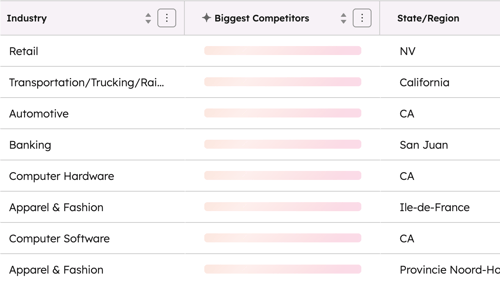
Finally, another major benefit is how the AI agent improves pipeline visibility. It surfaces signals that are often easy to miss: shifts in a company's situation, changes in relevance, and context that explains why a deal is moving, or why it isn't.
Most CRMs show the default activity data: number of deals, deal stage, close probability, and last activity. Your HubSpot is probably set up this way already. But what's often missing is the “why”.
Why is a deal stuck? Why is it accelerating? Why did a customer drop out of the pipeline?
The AI Data Agent brings context behind the activity. It helps surface the explanations you actually need, such as: “The company recently changed leadership”, “The key contact left the business”, or “ Your specialized content is showing a spike in engagement from that account”.
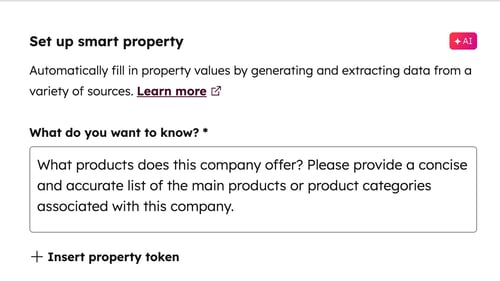
You get more than numbers. You get reasons.
Where it Falls Short
The AI Agent can sound like the final solution to an ongoing problem, but it's important to be honest upfront. It only works if your data is ready. This is where most people either oversell it or misunderstand its capability.
It is completely dependent on data quality. If your CRM is messy, inconsistent, or full of gaps, the outputs will reflect exactly that. The AI doesn't fix a weak foundation – it builds on top of it.
It can also create a dangerous sense of confidence. The outputs sound structured and credible, even when they're shallow or simply wrong. As a result, teams tend to trust it too quickly.
It also doesn't think strategically. It won't define your ICP, shape your go-to-market, or fix your positioning. It executes based on what you give it. If what you provide is vague, the outputs will be vague as well.
Finally, there's the overlap problem. If you're already using enrichment tools, scoring models, or sales intelligence platforms, you need a clear answer on what role Data Agent plays. Otherwise you're just adding another layer without removing anything.
Based on our experience, the mistake most teams make is treating it as a feature – something to turn on, explore occasionally, and use when it feels relevant. And honestly, that's a waste.
The real opportunity is treating it as an operational layer, something that feeds your scoring, triggers your workflows, and informs sales decisions in real time across the entire customer journey.
If it's not changing how decisions get made, it's not delivering value. It's just furniture.
What to Actually Do With It
We always go back to strategy fundamentals, and that doesn’t change just because you have a more powerful tool on your side. You still need to build the strategy first.
So where do you start? Begin with your ICP (Ideal Customer Profile). Get clear on what a "good customer" actually looks like, and define what signals you're going to follow. Are you tracking behaviors on your website, such as visits to highly-intent pages like a demo page? Or are you focusing on commercial intent signals based on search and engagement activity?
You also need clarity on what disqualifies a contact. For example if a contact is in an entry-level role, they may not be in a decision-making position, and therefore shouldn't trigger sales activity.
Once your strategy is clear, create a small number of properties that reflect what actually matters for your current goals. Be practical. Don't build ten, make it usable. Three to five is enough to manage properly. Keep it focused so people actually use it.
From there, move into execution. Connect those properties to workflows – think lead routing, qualification stages, and personalized sales sequences. That’s where the impact is realised.
And finally, review the outputs regularly. What's useful? What's wrong? What's being ignored? Adjust based on what’s actually happening, not what you hoped would happen.
Now you can move to the next level. If you need expert help, we’re here to help you choose the right AI agent for your business and prepare your data so you can start using AI tools effectively from day one.




.png)




-1.png?width=19&height=19&name=Vector%20(3)-1.png)

.png?width=19&height=16&name=Vector%20(4).png)

.png?width=18&height=24&name=Vector%20(5).png)