
The new HubSpot Connector for Claude gives you instant access to the strategic side of your business. It goes beyond content generation; we’re talking about campaign performance, channel attribution, customer experience monitoring, and team efficiency.
This means, you can ask questions like:
- What campaigns generated the most revenue last quarter?
- Which landing pages are actually converting?
- Where is my team overloaded?
And get answers instantly.
Just like interacting with our AI chat assistant, you can ask follow-up questions, uncover key strategic issues or opportunities, and move straight into action.
How to connect Claude with HubSpot
Connecting Claude to HubSpot takes less than five minutes and requires no project setup. There is no development work, middleware, or data migration involved – just a HubSpot account (any tier) and a paid Anthropic subscription (Pro, Max, Team, or Enterprise). Permissions remain fully intact, so users only see the HubSpot data they are already authorised to access.
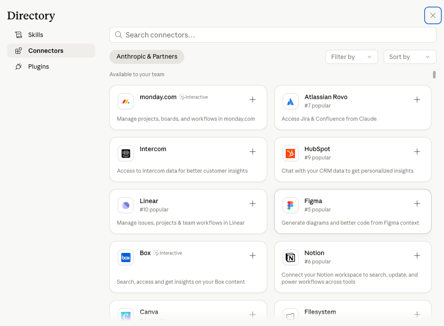
1. In Claude, open Connectors and select HubSpot.

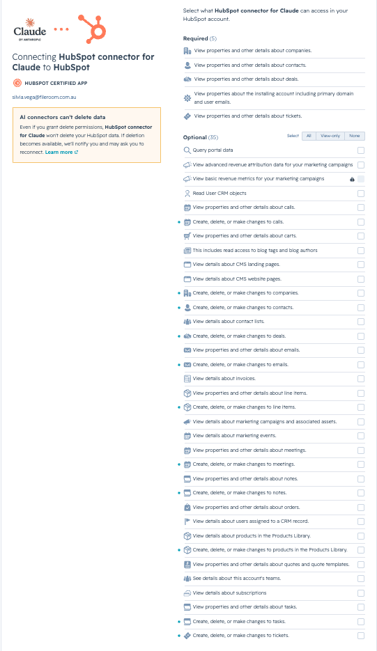
2. Sign in to HubSpot and approve the permissions.

3. Set write actions to require approval before anything updates in HubSpot.
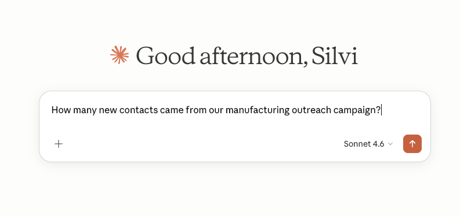
4. Start asking questions like you would in your AI Chat.
Four Things You Can Do This Week
1. Understand True Campaign Performance Beyond Clicks
Visitor and click counts are the most visible KPIs. With this integration, you can ask Claude which campaigns actually drove engagement, commercial intent, or revenue.
Prompts to try:
• “Which campaigns drove the most revenue last quarter, and which were just driving traffic without converting?”
• “For my top five campaigns by clicks, show how many contacts actually reached a sales conversation and which campaigns underdelivered on intent.”
• “Compare the campaigns with the highest engagement to the ones that generated real pipeline. Where is the gap between attention and commercial intent?”
2. Understand What Your Best Content Has in Common
Ask Claude to analyze your top-performing pages, spot patterns, and feed them into what you build next. Content planning starts from evidence, so you can start by surfacing these trends.
Prompts to try:
• “Look at my top ten landing pages by conversion over the last six months. What do they have in common – topic, structure, length, CTA?”
• “Which blog posts from the last quarter generated the most qualified contacts, and what topics do they cluster around?”
• “Compare the content from our best-performing campaign with the worst. What is actually different?”
3. See How Your Team Is Carrying the Pipeline
Claude can also help you visualize your team structure, deal ownership, and workload distribution on demand.
Prompts to try:
• “Show me all deals owned by my sales team, sorted by close date, and flag any that have slipped more than once.”
• “Compare workload across my direct reports. Who is over capacity, and which of their deals are at the highest risk?”
• “Which deals in the pipeline have had no activity logged in the last 14 days?”
4. Log Activity Without Leaving Your Workflow
Create contacts, update deal stages, log notes, and set follow-ups directly from Claude chat, with every change shown for review before it's saved in HubSpot.
Prompts to try:
• “Log a call note on the Acme deal: discussed pricing, next step is a technical review in two weeks, flag for follow-up.”
• “Create a new contact from these meeting notes and attach them to the Acme account.”
• “Move all deals in Stage 2 that have had no activity in 30 days to Stalled, and create a follow-up task on each.”
Our recommendation is to keep the connector set to require approval before write actions apply. Nothing changes in HubSpot without a conscious (human) decision.
The Takeaway
For Data-First oriented organizations, this update represents a meaningful improvement in how data is used across marketing, sales, and operations. It reduces friction, shortens the path from insight to action, and allows teams to operate with a level of responsiveness that is difficult to achieve when systems are disconnected. For others, it highlights exactly where the work is still needed before any real value can be extracted.
What matters here is not the introduction of another AI capability, but the removal of a barrier that has been slowing teams down for years. When data becomes available at the same moment decisions are being made, the quality and speed of those decisions tend to improve.
One thing matters most: the human stays in charge. Claude and HubSpot have built the bridge between your data and the power to surface it, but the person in front of the screen still owns the decision. Make it worth your while: give Claude strong context, ask questions that challenge your own assumptions, and keep pushing until you reach insights you can act on.
This is not a tool to automate and walk away from. It clears the retrieval work out of your way so you can focus on what only you can do: strategic planning and critical thinking.
If you want help configuring the connector for your HubSpot setup, or getting more value from it based on your current data structure, the Fileroom team is available to walk you through it.




.png)




-1.png?width=19&height=19&name=Vector%20(3)-1.png)

.png?width=19&height=16&name=Vector%20(4).png)

.png?width=18&height=24&name=Vector%20(5).png)