
Most businesses deal with unsubscribes the same way they deal with other “small admin tasks”: manually, inconsistently and usually only after someone remembers to do it.
And that’s exactly where the risk sits.
If a contact opts out and still receives an email – even once – you lose trust, damage your domain reputation and expose the business to GDPR, PECR, CAN-SPAM or Australian Privacy Act issues. For many organizations, compliance failures don’t happen because people ignore the rules. They happen because the process relies on humans updating fields, remembering steps and double-checking lists.
This is where automation becomes a safeguard, not a convenience.
Automate and Protect GDPR Compliance
A fully automated unsubscribe system updates records in real time, removes manual guesswork, and ensures no contact receives emails after opting out. It protects your sender reputation, reduces compliance exposure, and keeps your CRM clean – without extra admin.
Why Unsubscribe Compliance Matters
When a business sends email to someone who opted out, the damage is immediate and expensive. Spam complaints increase, domain health drops, and future campaigns get filtered. And trust erodes faster than any nurture sequence can rebuild it.
Automation removes the human element – the delays, the missed updates, the “I thought someone else handled it”. With a structured unsubscribe workflow in place, you avoid the operational gaps that create compliance risks.
Who this Impacts Inside Your Business
This matters for anyone who relies on accurate CRM and clean email data:
- Marketing teams sending campaigns or newsletters
- Sales teams using sequences
- Ops teams managing data governance
- Any organization emailing contacts in the United States, UK, EU or Australia
If email plays a role in revenue or retention, unsubscribe automation is not optional.
HubSpot can handle the entire unsubscribe process instantly and accurately, without anyone needing to touch a record. One simple workflow ensures every opt-out is captured, actioned and logged correctly. And for leaders, this means fewer risks, fewer surprises and a CRM that behaves exactly as your compliance policies expect.
How to Build an Automated Unsubscribe Workflow in HubSpot
You don’t need a technical team to do this. A few simple steps lock down one of the most common compliance risks.
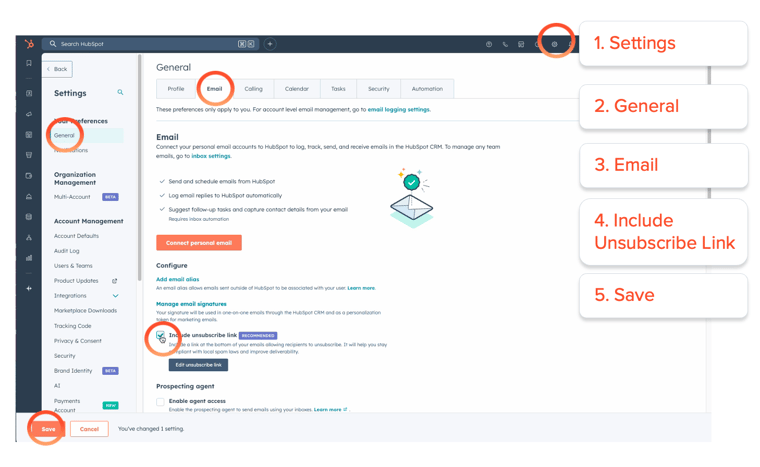
1. Add an unsubscribe reason (optional but useful)
It gives you insight into why people opt out and helps identify experience gaps.
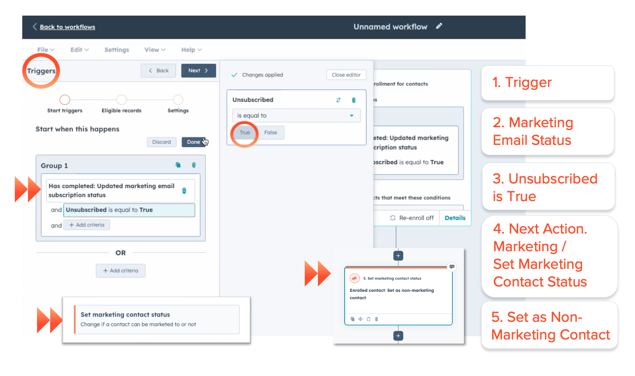
2. Create the unsubscribe workflow
Trigger: “Opted out of email” = True
Actions:
- Set “Marketing Email Status” to Unsubscribed
- Remove the contact from every active list, workflow and sequence
- (Optional) Update lifecycle stage to reflect inactivity
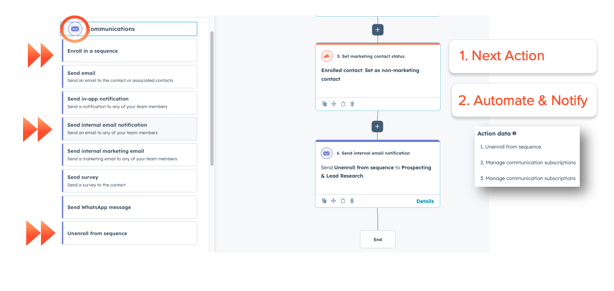
3. Notify your team when key accounts unsubscribe
Not every unsubscribe is equal. For major accounts, an internal alert helps leadership understand risks early.
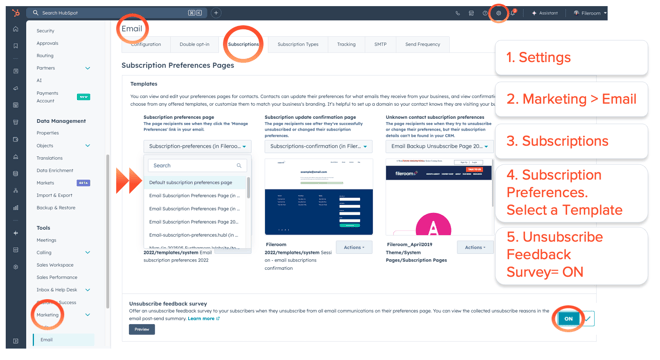
4. Use a subscription preferences page (optional)
Not every opt-out is a rejection. Many contacts simply want fewer emails, not zero emails.
The Risks this Workflow Eliminates
Manual unsubscribe management is one of the fastest ways to damage your domain reputation. One accidental send can trigger spam flags that affect your entire company. Automated workflows eliminate the inconsistency and ensure that every unsubscribe request is respected instantly, preventing reputational and compliance fallout.
Important Limitations to Understand
Even a perfect workflow has rules you need to know:
- Globally unsubscribed contacts cannot be emailed again under any circumstances.
- Contacts must re-subscribe themselves; you cannot do it for them.
- Sales sequences use their own unsubscribe logic – make sure both systems align.
- This workflow does not replace GDPR’s proof-of-consent requirement.
- Multi-brand organizations must maintain separate subscription types.
Need Expert Support?
If you want to protect deliverability, tighten compliance and streamline your subscription logic, we can review your full setup and make sure everything is airtight and scalable.
Schedule A Call



.png)




-1.png?width=19&height=19&name=Vector%20(3)-1.png)

.png?width=19&height=16&name=Vector%20(4).png)

.png?width=18&height=24&name=Vector%20(5).png)