Your CRM knows what was emailed. It has no idea what was said.
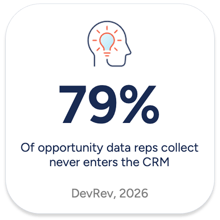
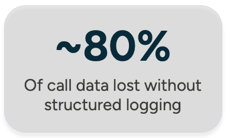
If your sales team closes business on the phone, there's a good chance the most important parts of those conversations never make it into your CRM. Important information such as the objections raised by a customer, commitments made, pricing discussed questions about your product that could trigger your next innovation trigger, all gone the moment the rep hangs up. What's left is a "called contact" activity log and whatever notes someone remembered to type.
This is the gap that a properly configured Aircall-HubSpot integration closes. It doesn't just log call activity, it extracts key information using AI and then pull insights in a dashboard for you.
What Is the Aircall HubSpot Integration and Why Does It Matter?
When Aircall is connected to HubSpot, every call is automatically logged against the relevant contact, company, deal, or ticket record. That's the baseline. The more valuable layer is what happens with AI enabled:
- AI Call Summaries: A structured written overview of each conversation synced directly to the HubSpot record
- Full Transcription With Speaker Separation: searchable, so you can find every call where a competitor was mentioned
- Sentiment Analysis and Talk Ratios: AI flags calls where the customer expressed frustration, or where the rep dominated the conversation
- Playbook Summaries: AI organizes calls against frameworks like MEDDIC or PACTT, giving managers consistent qualification data without reps manually filling it in
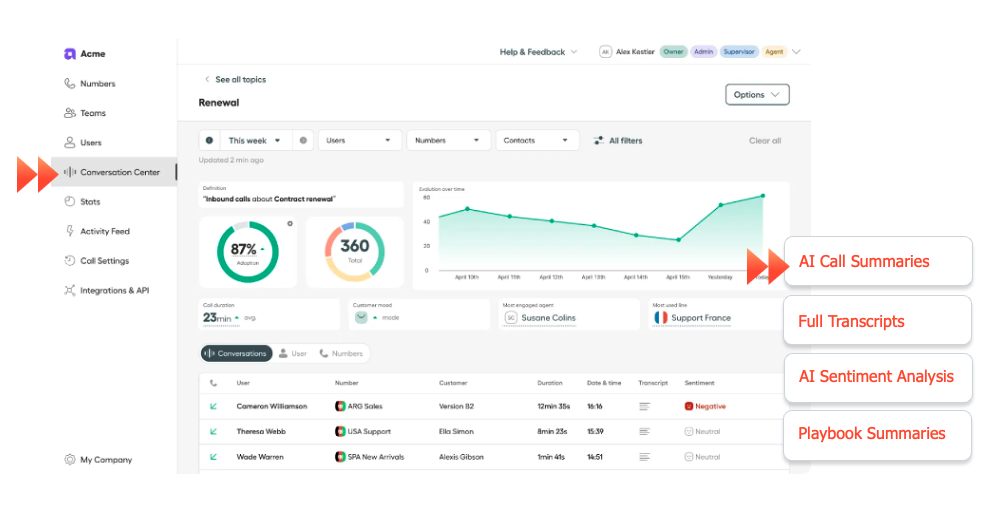
The result: your CRM stops being a contact database and starts becoming a record of what your customers actually care about.
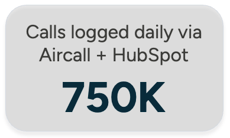
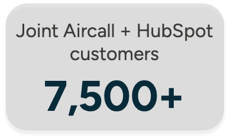
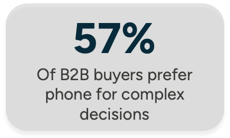
Over 7,500 businesses run more than 750,000 calls per day through the integration. Phone remains central to B2B sales — and most of that conversation data is currently invisible.
What Are the Prerequisites for Setting Up Aircall With HubSpot?
Aircall side: An active account with at least one provisioned number. The Professional plan is required for smart routing. If you want AI features like summaries, sentiment, playbooks, you need AI Live Assist enabled.
HubSpot side: Basic call logging works on Free CRM. Transcription and keyword search require Sales Hub Professional or Enterprise (or Service Hub equivalent). Before you start, confirm Conversational Intelligence is enabled under Settings > Calling > Transcription and Analysis.
Missing either of these creates partial sync, broken workflows, and a messy data trail that's hard to unpick later.
How Do You Set Up the Aircall HubSpot Integration?
Installation takes roughly ten minutes once prerequisites are confirmed.
1. In HubSpot, go to the App Marketplace and search for Aircall2. Click Install and authenticate with your Aircall admin credentials
3. In the Aircall Dashboard, set the integration to Active and assign the phone numbers you want to sync
4. Configure call outcomes — how answered, unanswered, and wrong-number calls are categorised
5. Enable AI logging toggles: summaries, sentiment, action items, talk ratio data
The installation is the easy part. The real work, and the real value, is in what comes next: call outcome mapping, phone number assignment, workflow triggers, report building.
What Comes After Installation?
Once the integration is live, three things determine how much value you actually get out of it: smart routing, workflow automation, and reporting. Get these right and every call becomes a data point your whole revenue team can act on. Skip them and you've got a more expensive call log.
1. Smart Routing: How Does Smart Routing to HubSpot Contact Owners Work?
When a known contact rings your shared sales line, smart routing connects them directly to their HubSpot contact owner automatically. This way, the caller doesn't repeat their history and the rep doesn't scramble to pull up context mid-ring.
This uses Aircall's Smartflows with the Ring-to (via API) widget. When a call comes in, it queries HubSpot in real time, retrieves the contact owner, and routes accordingly. If no match exists, a fallback rule kicks in.
Setting this up requires creating a custom contact property to store the Aircall User ID of each owner, plus a Bearer Token via HubSpot's Private Apps. It's worth the setup time — particularly for businesses with established customer relationships where being recognized on the first ring matters.

2. Operational Workflows: How Do You Use HubSpot Workflows With Aircall Call Data?
The integration creates four HubSpot contact properties that update automatically with every call:
- Last Aircall call timestamp
- Last Aircall call outcome (Connected, Busy, No answer)
- Last used Aircall phone number
- Last used Aircall tags
These become workflow enrollment triggers. A few examples that work well for B2B teams:
- Send a follow-up email when outcome = "Connected" and tag = "Demo Scheduled" — fires within minutes of the call ending
- Notify a manager when a contact has three consecutive unanswered attempts
- Create a task when sentiment data indicates a negative call outcome
This is what moves the integration from a call logging tool to something that actually changes how your team responds.
3. Executive Reports: How Do You Build Call Reports That Connect to Revenue?
With clean call data in HubSpot, three report types are worth building first:
1. Call Activity by Rep. Total calls, duration, outcomes. Reveals workload imbalances and shows who's actually using the phone versus relying on email.
2. Keyword Frequency. With term tracking enabled in HubSpot's Conversational Intelligence, you can report on how often competitors, specific products, or objection phrases appear across calls. Patterns across your pipeline become visible at scale.
3. Call-to-Revenue Correlation. The most valuable, and the most neglected. Link call activity to deal progression and closed-won outcomes. How many calls happen before a deal closes? Which AI-flagged behaviors correlate with wins? This is how you turn call data into a genuine coaching asset.
What Are the Most Common Aircall HubSpot Integration Issues?
Calls not logging: Check the integration is set to Active in the Aircall Dashboard. Calls made while it's inactive do not log retroactively — there is no catch-up.
Unmatched contacts: Aircall uses E.164 phone number format. If contact records in HubSpot store numbers differently, automatic matching fails and call logs float without context. Standardise phone number formatting across your database before going live.
AI settings not appearing: AI logging options only show if AI Live Assist is active on your Aircall subscription. If you don't see the toggles, the feature isn't enabled — contact your account manager.
How Does Fileroom Help With Aircall HubSpot Implementations?
Fileroom is both an Aircall Gold Partner and HubSpot Diamond Partner. For B2B and industrial businesses running complex environments like Simpro, custom ERPs, field service operations, the technical requirements around smart routing, API authentication, custom property setup, and cross-system data sync are real. We architect integrations where call context flows into job records and customer history is visible before a technician picks up the phone.
If you want to talk through what this looks like for your business, get in touch with the Fileroom team.
FAQs About Implementing Aircall With HubSpot for AI Call Reporting
What HubSpot plan do I need for AI call features? Basic call logging works on HubSpot Free CRM. Transcription and keyword search require Sales Hub Professional or Enterprise, or Service Hub Professional or Enterprise with paid seats. AI features from Aircall like summaries, sentiment, playbooks depend on your Aircall subscription and whether AI Live Assist is enabled.
Can I use Aircall with HubSpot if I already have another phone integration? Yes, but running multiple phone integrations creates duplicate records and conflicting data. Consolidating to one phone system gives you clean, reliable reporting. If you're transitioning from another provider, Fileroom helps migrate configurations and historical data where possible.
Can I track which marketing campaigns generate phone calls? Yes. HubSpot's attribution reporting includes call engagements when properly configured. Workflows can automatically tag calls based on contact properties set by prior marketing activity, connecting phone conversations to campaign sources and closing the loop on ROI.
What happens to call data if I disconnect the integration? Existing call engagements stay in HubSpot. New calls stop logging until you reactivate. Calls made during the disconnection period do not sync retroactively. Worth keeping in mind if you're troubleshooting or temporarily pausing the connection.
Does Fileroom offer Aircall HubSpot implementation services? Yes. Fileroom specialises in integrations for B2B and industrial businesses, including configuration, smart routing, AI feature enablement, and custom API connections to platforms like Simpro and ERP systems. Contact Fileroom to discuss your requirements.




.png)




-1.png?width=19&height=19&name=Vector%20(3)-1.png)

.png?width=19&height=16&name=Vector%20(4).png)

.png?width=18&height=24&name=Vector%20(5).png)